
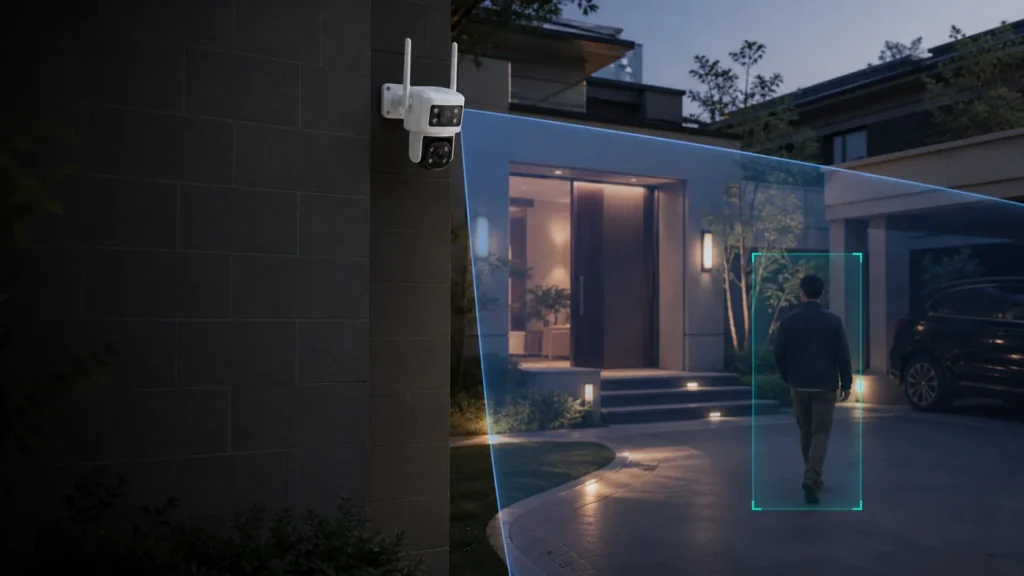
A dual-lens security camera puts two optical channels in one housing, but that does not automatically mean twice the image quality or twice the coverage. The two lenses may create a stitched panorama, show wide and close-up views together, or keep a fixed overview while a movable lens tracks activity.
For distributors, e-commerce sellers and private-label brands, that distinction is the buying decision. The value is not the number of lenses printed on the box. It is whether the second view solves a visible problem that a single-lens camera cannot solve as clearly.
This guide explains the main dual-lens architectures, where they add value, what they do not fix, and which specifications a B2B buyer should verify before placing an order.
What is a dual-lens security camera?
A dual-lens security camera uses two lenses and usually two image sensors inside one device. Depending on the design, the camera can combine both images into a panorama, display two views at once, or assign different jobs to each lens, such as maintaining an overview and following a moving subject.
The term describes the hardware layout, not one standard feature set. Two products can both be called dual-lens cameras while behaving very differently in the app.
One model may use two fixed lenses pointed in slightly different directions and stitch the images into one wide frame. Another may pair a wide-angle lens with a telephoto lens to show context and detail. A third may keep one lens fixed while a pan-and-tilt lens follows a person across a driveway.
That is why the first sourcing question should not be, "Does it have two lenses?" It should be, "What does each lens do, and what does the buyer see?"
The three common dual-lens camera architectures
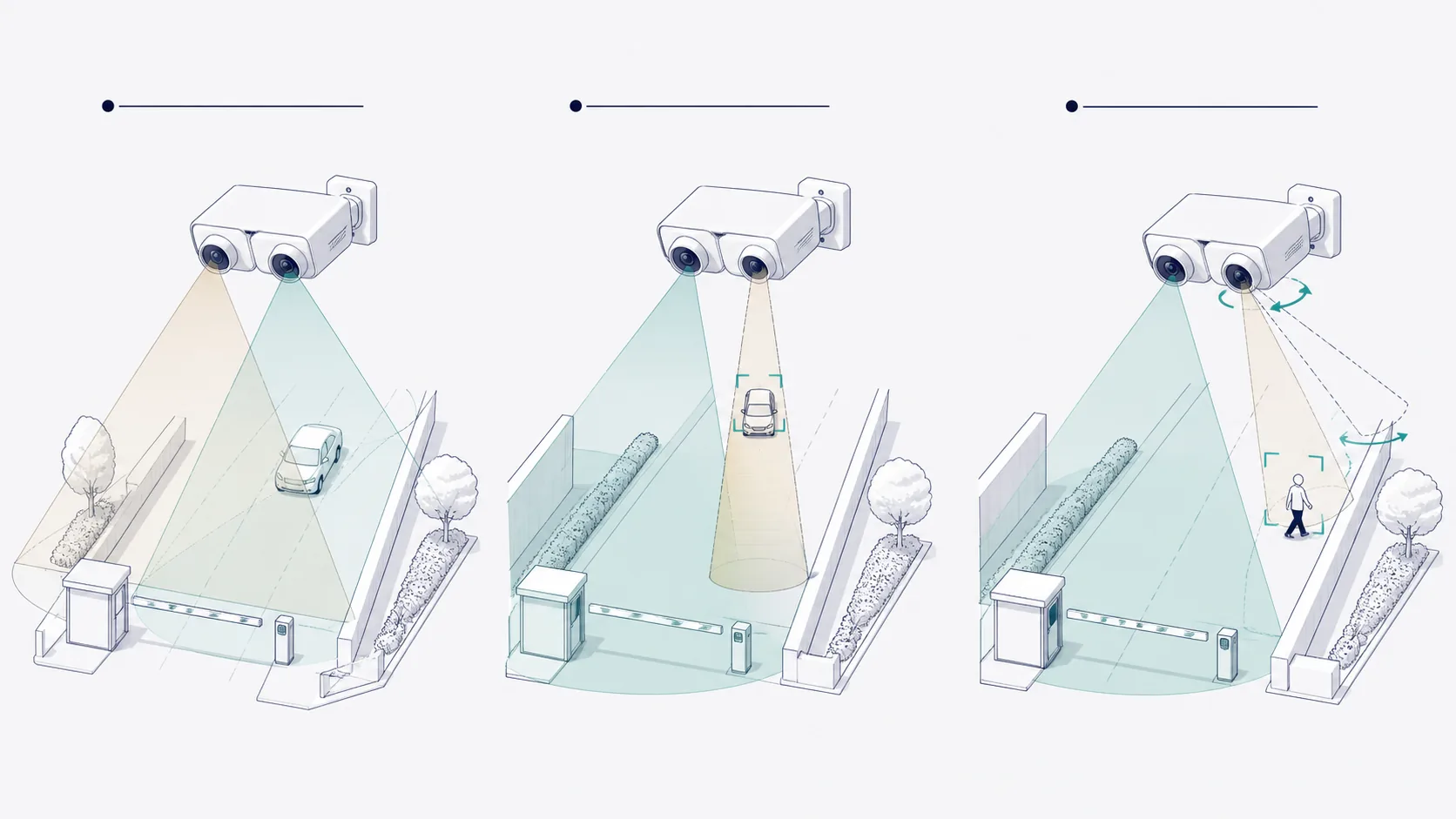
Dual-lens cameras generally fall into three practical groups. The architecture determines the product story, installation fit and app experience.
1. Two fixed lenses for a stitched panorama
Two fixed lenses can point across adjacent parts of a scene and combine their images into one wide view. This architecture is useful for broad areas such as parking rows, wide storefronts and open yards where the buyer wants more horizontal context from one mounting point.
Reolink's Duo Series P757 is one public example: its manufacturer describes two sensors and image stitching used to create a 180-degree panoramic view. That is different from a camera showing two separate feeds.
Buyers should inspect the stitch line, edge distortion, exposure matching and night performance. A wide daytime demo can look impressive while revealing visible seams or uneven brightness in more difficult lighting.
2. Wide-angle plus telephoto lenses
This architecture keeps a broad overview while presenting a closer view of the subject. It is useful when the user needs to understand both where an event is happening and what the person, vehicle or object looks like.
Reolink's TrackMix documentation describes a wide-angle and telephoto lens pair that displays an overview and close-up together. The important point for buyers is not the brand example itself; it is that the second lens has a different focal role rather than simply duplicating the first view.
Ask whether both streams are available simultaneously, whether the close-up is optical or digitally cropped, and whether the app records both views or only shows one during live view.
3. Fixed overview plus pan-and-tilt tracking
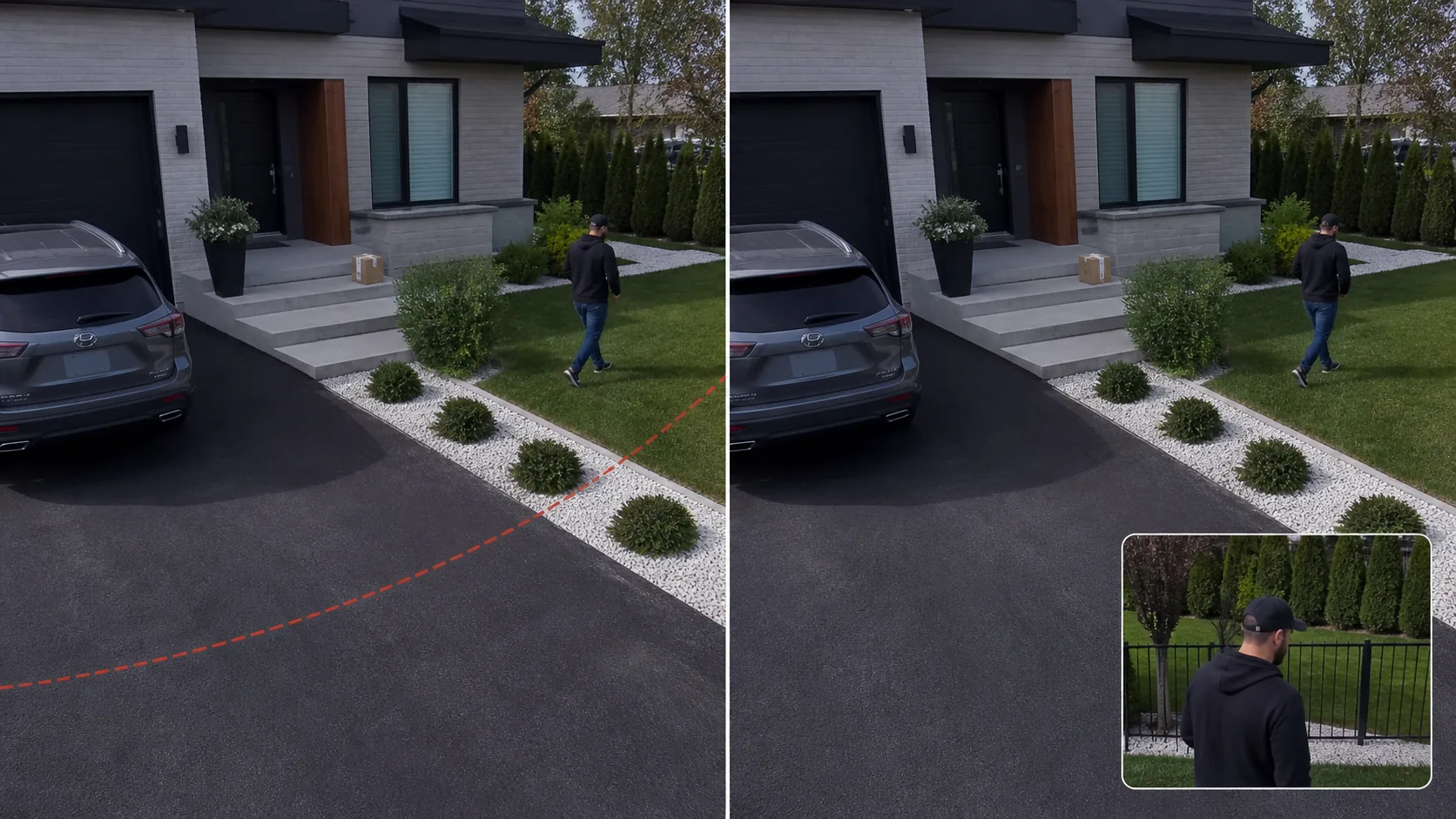
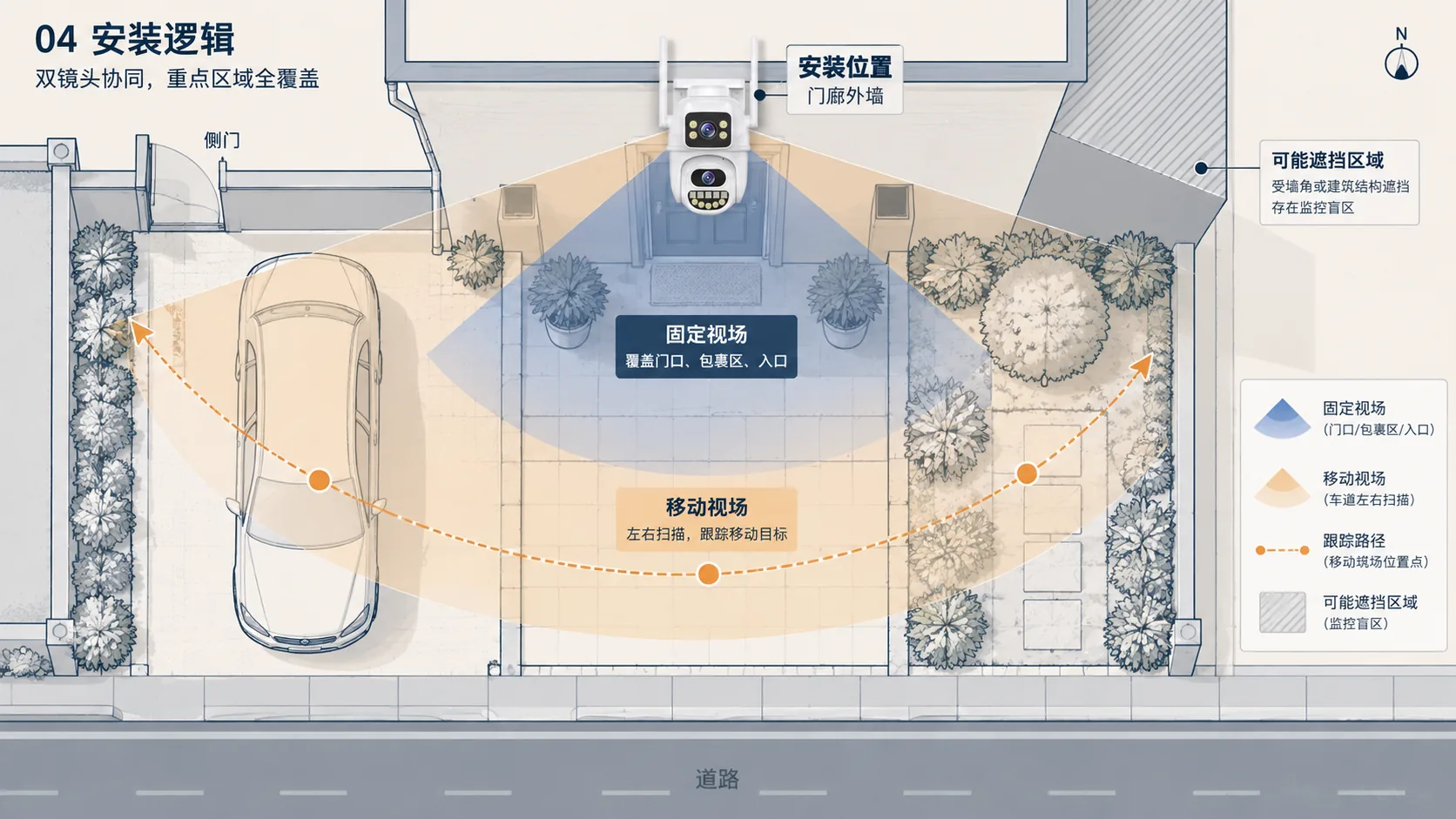
One lens keeps the important area visible while the second lens rotates to follow movement or inspect another part of the scene. This is the most direct answer to a common weakness of single-lens PT cameras: once the lens turns away, the original entrance or gate is no longer in frame.
Hikvision's public description of TandemVu technology uses this same overview-and-detail logic: a fixed lens maintains the larger scene while a motorized lens checks specific events.
The architecture can reduce loss of context during tracking, but it does not guarantee complete coverage. Mounting height, wall position, lens angle, tracking range and scene obstructions still determine what the camera can see.
Dual-lens vs single-lens security cameras
A single-lens camera is often the better choice for a simple, well-defined viewing area. A dual-lens camera becomes useful when the installation needs a wider scene, simultaneous context and detail, or a persistent overview while another lens moves.
| Buyer question | Single-lens camera | Dual-lens camera |
|---|---|---|
| What does one mounting point cover? | One fixed or movable viewpoint | Two optical viewpoints or a combined panorama |
| What happens during PT tracking? | The original scene may leave the frame | Some designs keep a fixed overview while the second lens tracks |
| Is the app experience simple? | Usually one feed and one set of controls | May require dual-view, stitching or lens-specific controls |
| What should resolution mean? | Usually one sensor and one stated stream | Total resolution may be combined, stacked or different per lens |
| Network and storage demand | Usually lower and easier to estimate | Can be higher if two streams are recorded or viewed together |
| Best fit | A doorway, room or narrow zone with a clear angle | Wide entrances, driveways, storefronts and scenes requiring context plus detail |
| Main sourcing risk | Field of view is too narrow | The second lens adds complexity without a clear buyer benefit |
The comparison is not "one lens bad, two lenses good." A well-positioned single-lens camera can outperform a poorly specified dual-lens camera. The right question is whether the second optical channel changes the outcome at the target site.
When is a dual-lens security camera worth it?
A dual-lens security camera is worth the added cost when the second view prevents a real coverage problem, improves event understanding or gives the seller a clearer product story. It is less valuable when both lenses show nearly the same scene or the target area already fits comfortably inside one fixed view.
Entrances and driveways
An entrance has two competing needs: keep the door or gate visible, and follow a person or vehicle moving through the approach. A fixed-plus-tracking design can handle those jobs simultaneously, making the benefit easy to demonstrate in listing images and sample tests.
Storefronts and small commercial sites
A shop may need a persistent view of the doorway while also watching the pavement, parking edge or customer approach. Dual views can give the owner more context without installing two separate housings, although local regulations and privacy zones still need consideration.
Wide yards and parking areas
A panoramic design can make sense where the buyer needs horizontal coverage more than zoom or tracking. Here, stitching quality and night exposure matter more than PT range.
Indoor family, pet and room monitoring
An indoor dual-view camera can separate a room overview from a more focused viewing angle. The value depends heavily on how clearly the app presents both feeds. For indoor buyers, privacy controls, shared access and notification quality may matter more than the second lens itself.
E-commerce product differentiation
Dual-lens hardware is visible and demonstrable. A seller can show two real views, a tracking sequence or a panorama instead of relying on generic phrases such as "advanced AI." This can support a higher product tier, but only when the listing explains the benefit in one image or short video.
What a second lens does not solve
Two lenses do not fix weak Wi-Fi, poor mounting, bad night lighting, unreliable detection or confusing software. They can also create new problems if the app, processor and storage design are not built to handle two optical channels well.
Do not assume a dual-lens model automatically provides:
1. twice the resolution on every recorded stream;
2. zero blind spots in every installation;
3. simultaneous recording from both lenses;
4. better low-light performance;
5. stronger AI detection or optical zoom.
Those outcomes depend on the actual architecture. A two-lens product may prioritize panorama, dual view, close-up detail or tracking. It cannot be evaluated from the housing alone.
Can one dual-lens camera replace two single-lens cameras?
Sometimes, but lens count alone does not prove that one device can replace two cameras. A panoramic model may cover the width previously handled by two fixed cameras. A fixed-plus-tracking model may combine an overview and a movable detail view at one mounting point. Neither automatically provides the redundancy, independent angles or recording behavior of two separately positioned cameras.
For a B2B buyer, compare total installed outcomes rather than unit prices:
| Cost or risk | One dual-lens unit | Two single-lens units |
|---|---|---|
| Hardware | Usually a higher unit price | Two lower-priced units may cost more together |
| Installation | One housing, one mounting point and one power/network plan | Two mounts, two cable paths and more installation time |
| Coverage flexibility | Both views are constrained by one mounting position | Each camera can be placed at a different angle |
| Failure impact | One device failure can remove both optical views | One camera may continue recording if the other fails |
| App and support | One device with a more complex dual-view interface | Two simpler devices but more channels to manage |
The dual-lens option is strongest when one mounting point naturally sees the entire target area and the second view adds context or detail. Two separate cameras remain stronger when the site needs independent viewpoints, physical redundancy or coverage around different corners.
The specifications B2B buyers should verify
The fastest way to expose a weak dual-lens proposal is to ask for lens-by-lens details. A supplier should be able to explain what each sensor records, how both views appear in the app and what is saved during an event.
Resolution per lens and output stream
Ask whether the advertised megapixel figure is per sensor, a combined total, a stitched output or the resolution of the main stream. For example, FAELAN's FLC-800PO public specification states two 3MP sensors in a stacked 6MP configuration. That is more useful than a standalone "6MP" badge because it explains how the total is formed.
Lens role, focal length and field of view
Confirm the focal length and purpose of each lens. Two identical wide lenses serve a different use case from a wide-plus-telephoto pair or a fixed-plus-PT pair. Request actual field-of-view images from the intended mounting distance.
Simultaneous viewing and recording
Ask to see the live-view layout, event playback and exported clips. Some cameras display two views in the app but save them differently. Confirm whether the buyer can replay both channels, switch between them, or receive a combined output.
Tracking behavior
For a fixed-plus-PT camera, test how tracking starts, how quickly it follows, where it stops and whether it returns to a guard position. Also check what happens when two people enter the scene or the subject passes behind an obstruction.
Night vision on both optical channels
Request night footage from both lenses, not only the stronger channel. Check infrared reflection, white-light exposure, moving subjects and differences in color or brightness between views.
Bandwidth, storage and compression
Two optical channels can increase bandwidth and storage demand. Confirm frame rate, codec, stream count, microSD limits, cloud behavior and NVR compatibility. For system projects, ask whether the claimed protocol support covers the exact streams and controls you need.
Interoperability and cybersecurity
Do not treat an "ONVIF supported" label as proof of official conformance. ONVIF says its conformant-products database is the authoritative verification source. ONVIF Profile T covers advanced streaming functions such as H.264/H.265, imaging settings, events, metadata and conditional PTZ/audio capabilities, but buyers still need to verify the exact product and firmware.
How to test a dual-lens sample before ordering
A supplier presentation is not enough. Test the camera in a scene that reproduces the buyer's actual problem.
1. Choose one fixed reference point. Use a door, gate, counter or parked vehicle that must remain visible.
2. Move a subject across the scene. Walk from one edge to the other and trigger any supported tracking behavior.
3. Review both live views. Confirm that the overview, close-up or tracking view behaves as described.
4. Replay the event. Check what was actually recorded, not only what appeared during live view.
5. Repeat under difficult conditions. Test at night and at the expected Wi-Fi distance or over the intended wired connection.
Export clips and screenshots after the test. They turn the second lens from a marketing claim into observable evidence for the buying team, marketplace listing and support documentation. They also reveal which installation instructions the end buyer will need.
What sellers should show on a dual-lens camera listing
A product render with two visible lenses is not enough. The listing must explain why the second lens exists.
The strongest visual sequence is:
1. the full installation scene;
2. the fixed or wide overview;
3. the close-up or tracking view from the same event;
4. the dual-view app or playback result;
5. a single-lens comparison followed by an honest specification panel explaining both sensors.
Avoid adding detection boxes that do not match the camera's real viewing direction. Avoid calling digital cropping "optical zoom." Avoid using a stitched panorama if the shipping product actually presents two separate feeds.
For a broader explanation of event classification and buyer value, see AI Security Camera vs Traditional Security Camera. For connection planning, see Common Problems with WiFi Security Cameras.
FAELAN dual-lens camera options
FAELAN's current public range uses dual-lens positioning across different price and use-case tiers. The models are not presented as identical architectures, so buyers should select by scene and verify the final sample behavior.
| Model | Public positioning | Best initial fit | What to confirm |
|---|---|---|---|
| FLC-200LO | 2MP outdoor dual-lens visual positioning with pan-and-tilt coverage | Entry outdoor, entrances and small storefronts | Final stream behavior, storage and environmental figures |
| FLC-400SI | 3MP indoor dual-lens positioning with dual-view and pan-and-tilt visual material | Family rooms, pets and small interiors | Exact lens roles, recording modes and app presentation |
| FLC-500SO | 3MP outdoor dual-lens positioning with pan-and-tilt coverage | Mainstream outdoor, entrances and perimeter scenes | Final tracking, stream and detailed datasheet behavior |
| FLC-800PO | 6MP stacked dual-lens outdoor camera with fixed overview plus 355-degree tracking | Premium outdoor, driveways, gates and storefronts | Sample performance at the buyer's mounting distance and network conditions |
FLC-800PO has the most complete currently published specification: dual 1/2.8-inch 3MP sensors, dual 4 mm lenses, 355-degree pan, 90-degree tilt, human-shape detection, Wi-Fi plus Ethernet, local microSD recording up to 128GB and IP65 outdoor positioning. FCC, CE and RoHS documentation is listed for the model.
For the other dual-lens models, the public pages deliberately keep several implementation details available on request. That is the correct point to ask for the final datasheet and sample rather than assume every feature shown in visual material is identical across SKUs.
A sourcing checklist for distributors and private-label brands
Before approving a dual-lens security camera, confirm these questions in writing:
| Question | Evidence to request |
|---|---|
| What job does each lens perform? | Lens map, focal lengths and real sample frames |
| Is resolution stated per lens or as a total? | Sensor table and output-stream screenshots |
| Are both views live and recorded? | App demo plus exported event clips |
| Is zoom optical, hybrid or digital? | Lens specification and side-by-side sample |
| How does tracking affect the overview? | Full event recording with the reference area visible |
| What happens at night? | Moving-subject clips from both channels |
| What storage and network load should we expect? | Bitrate, codec, frame rate and storage calculation |
| Is interoperability officially verified? | Exact protocol/profile statement and conformant-product record where applicable |
| Which claims can appear on the listing? | Approved claim sheet tied to the final SKU and firmware |
| Can the supplier provide listing assets? | Product images, installation scenes, dual-view examples and support copy |
For a private-label program, add app ownership, firmware policy, packaging, certification documents, sample lead time and warranty terms to the same review. A dual-lens housing can attract attention, but the repeatable product is the complete hardware, app, documentation and support package.
Frequently asked questions
Is a dual-lens security camera better than a single-lens camera?
It is better when the second lens solves a specific coverage problem, such as keeping an entrance visible while tracking movement or combining overview and close-up views. For one narrow, stable scene, a good single-lens camera may be simpler and more cost-effective.
Does a dual-lens camera record both views at the same time?
Some do, but not all products save or export both views in the same way. Ask to see live view, playback and an exported event clip before ordering. Do not infer recording behavior from a dual-view app screenshot.
Does 6MP mean each lens is 6MP?
Not necessarily. The number may describe one sensor, a combined total or a stitched output. Buyers should request resolution per sensor and the final output-stream resolution. FLC-800PO, for example, is publicly specified as two 3MP sensors in a stacked 6MP configuration.
Can a dual-lens camera eliminate blind spots?
It can reduce specific blind spots or preserve context during tracking, but no camera guarantees complete coverage in every installation. Wall position, mounting height, obstructions, field of view and PT range still matter.
Is dual-lens useful indoors?
Yes, when the buyer benefits from a room overview plus a second angle or movable view. The app must present the two views clearly, and privacy controls, sharing and notifications should be evaluated alongside the optics.
What is the most important dual-lens sample test?
Keep one door, gate or other reference point visible while a person moves across the scene. Then check the live view and recorded playback. This reveals whether the camera preserves context, how tracking behaves and what the buyer will actually receive.
Final decision
A dual-lens security camera is worth sourcing when the second optical channel creates a benefit the buyer can see: a wider panorama, simultaneous overview and close-up, or a fixed reference view that remains visible during tracking.
Do not buy the lens count. Buy the verified viewing behavior, recorded evidence and installation fit.
Review the FAELAN AI camera range or send us your target scene, channel and order requirements. We can recommend a model, prepare sample material and confirm which specifications are ready for public listing.